Setting up an Ubuntu 24.04 EC2 instance for algorithmic trading with Interactive Brokers
Posted on Fri 28 February 2025 | Part 1 of Building Real Trading Systems | 5 min read
This guide walks through setting up an Ubuntu 24.04 EC2 instance for running algorithmic trading systems with Interactive Brokers. The goal is to provision a clean, secure environment suitable for both development and live trading automation.
Inspired by Dimon's How to setup IBC (3.8.1) + TWS (build 976) on headless Ubuntu 18.04 LTS to run TWO accounts (paper + real) in 10 minutes, this guide has been updated for the latest Ubuntu release.
Configuring EC2 for Algorithmic Trading: Initial User Setup
Create a new user, assign a password, and grant sudo privileges.
useradd -d /home/ubuntu -s /bin/bash -m ubuntu && passwd ubuntu && adduser ubuntu sudo
vim /etc/sudoers and add the line: ubuntu ALL=NOPASSWD: ALL
Next, restrict SSH access so that only the ubuntu user is allowed to authenticate.
sudo su - ubuntu
mkdir ~/.ssh
vim ~/.ssh/authorized_keys and paste your public key
sudo vim /etc/ssh/sshd_config and add AllowUsers ubuntu
sudo systemctl restart sshd
Update the system packages:
sudo apt update
sudo apt -y upgrade
Verify that the system clock is synchronized with NTP: timedatectl status
Optional: install zsh and ohmyzsh
Install zsh: sudo apt install zsh
Update sudo vim /etc/passwd to set your login shell to /usr/bin/zsh
Install ohmyzsh: sh -c "$(curl -fsSL https://raw.githubusercontent.com/ohmyzsh/ohmyzsh/master/tools/install.sh)"
Installing xvfb and VNC
To run TWS and IBGateway in a headless environment, install the necessary packages and configure a virtual framebuffer (Xvfb) alongside a VNC server.
sudo apt install -y xvfb x11vnc x11-apps metacity zsh
Start the Virtual Framebuffer: /usr/bin/Xvfb :2 -ac -screen 0 2048x1536x24 &
Prepare the Log File for x11vnc:
sudo touch /var/log/x11vnc.log
sudo chmod a+rw /var/log/x11vnc.log
Run the VNC server.
/usr/bin/x11vnc -ncache 10 -ncache_cr -passwd your_password -display :2 -forever -shared -logappend /var/log/x11vnc.log -bg -noipv6
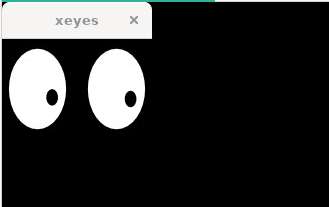
Use VNC Viewer to connect to your server on port 5900. To verify that the virtual display is working correctly, run:
DISPLAY=:2 xeyes &
DISPLAY=:2 metacity &
You should see something like this:
Installing and configuring TWS
Download the latest offline TWS version (the URL might change, you can get the latest one here):
wget https://download2.interactivebrokers.com/installers/tws/latest-standalone/tws-latest-standalone-linux-x64.sh -P /tmp/
chmod +x /tmp/tws-latest-standalone-linux-x64.sh
Run the installer: DISPLAY=:2 /tmp/tws-latest-standalone-linux-x64.sh
Installing and configuring IBGateway
Get the latest offline IBGateway version (the URL might change, you can get the latest one here):
wget https://download2.interactivebrokers.com/installers/ibgateway/latest-standalone/ibgateway-latest-standalone-linux-x64.sh -P /tmp/
chmod +x /tmp/ibgateway-latest-standalone-linux-x64.sh
Run the installer: DISPLAY=:2 /tmp/ibgateway-latest-standalone-linux-x64.sh
And run IBGateway: DISPLAY=:2 ~/Jts/ibgateway/1044/ibgateway
IBKR forces customers to restart the software once a day.
In order to do this, go to Configure > Settings > Lock and Exit. Check Auto Restart and set the restart time (I recommend to choose a time during the Server Reset Times window)
Securing the server
Allowing Loopback Connections:
sudo ufw allow in on lo
sudo ufw allow out on lo
Allow outbound traffic on the EC2 network interface:
sudo iptables -A OUTPUT -o ens5 -j ACCEPT
Open the required ports (SSH 22, VNC 5900), then set the default policy to deny all other inbound traffic:
sudo ufw allow 22/tcp
sudo ufw allow 5900/tcp
sudo ufw default deny incoming
Enable the firewall: sudo ufw enable
Conclusion
This guide has taken you through setting up an Ubuntu 24.04 EC2 instance for algorithmic trading with Interactive Brokers.
By following these steps, you'll have a robust, secure, and scalable platform for your algorithmic trading needs. As your setup evolves, consider adding monitoring tools and automation scripts to improve reliability and reduce operational overhead.